




A few years ago, to launch a small business you needed to find a marketer, a designer, a copywriter, an administrator and someone to deal with customers. Now you can do much of that yourself. Not because entrepreneurs suddenly became jacks-of-all-trades, but because tools have appeared that take on hours of routine work.
Artificial intelligence (AI) in business has long moved beyond just text and images. It processes orders, analyses sales, prepares advertising and holds conversations with buyers. And people without a technical background can use it. But can one person really handle what used to require a team? And how much can you save?
Why hiring is no longer a must at the start
A typical day for an online shop owner
Take someone who sells goods online. In the morning there are orders, messages, updating the assortment, negotiations with suppliers, payment checks. Then promotions, social media posts, profit calculation.
All of this can easily take 10–12 hours a day. Hiring a separate person for each task is costly, especially when the business is just getting off the ground.
What automation takes on
This is where AI comes in handy. Instead of jumping between dozens of small tasks, the owner sets up tools that perform repetitive actions. They prepare replies to buyers, write descriptions of new products, and compile weekly reports. The person only checks the results and makes decisions where experience is needed.
It doesn’t always fully replace a team, though. AI won’t deliver a parcel, fix equipment or assume legal liability. Its strength is in working with information.
Five areas where AI removes the most work
Where it’s most useful
- Marketing. Ad copy, headlines, content plans, scripts for short videos. The owner chooses the best and tests it on a live audience.
- Customer support. A chatbot answers questions about delivery, payment and product availability, and hands complex enquiries to a person.
- Finance. Processing spreadsheets, comparing expenses across periods, anomaly detection, draft budgets.
- Content and design. Product descriptions, ad layouts, illustrations, presentation templates.
- Administration. Tasks, emails, meeting summaries, deadline tracking.
Where to start
You don’t need to implement everything at once. Find two or three tasks that take the most time each week and test how well a programme handles them.
Which services can replace part of an office
ChatGPT, Claude, Gemini
You don’t have to develop your own solution; there are ready-made services in the browser or an app. General assistants like ChatGPT, Claude or Gemini help with commercial proposals, documents, campaign planning and spreadsheets.
For example, a café owner who wants to sell more breakfasts can describe the menu, average ticket, who the customers are and receive several promotion ideas, ad copy and a week’s posting plan.
The more specific the task, the less you’ll need to edit afterwards. For instance, you can ask for five ad texts of up to 100 words each for a café near a university, focusing on morning combos. But you must check the responses, especially figures, laws and promises to customers.
Canva and image generators
Design is a separate cost item. Even simple banners and covers take time.
Canva has templates and AI features that let you produce a series of posts in the same style and quickly adapt sizes for different platforms. Image generators help with illustrations for ad concepts.
Photos of real products are better left authentic, though, because the buyer should receive what they saw.
Zapier and Make
The most interesting things happen when services work together. An application from a website form can go straight into the CRM, the client receives confirmation and the owner gets a notification.
Zapier and Make allow you to build such chains between compatible apps; much can be done without programming. But for complex integrations, payments or personal data you may need a technical specialist.
Microsoft Copilot
Those who work in Microsoft 365 may find Copilot useful. Depending on the plan, it helps with documents, spreadsheets, presentations and work information. In September 2026 Microsoft announced new Copilot features, including Home, Code and Autopilot.
For small business the most useful things are quick drafts, concise summaries of long documents and search across work materials you have access to.
How much time and money you can save
A hypothetical example for an online shop
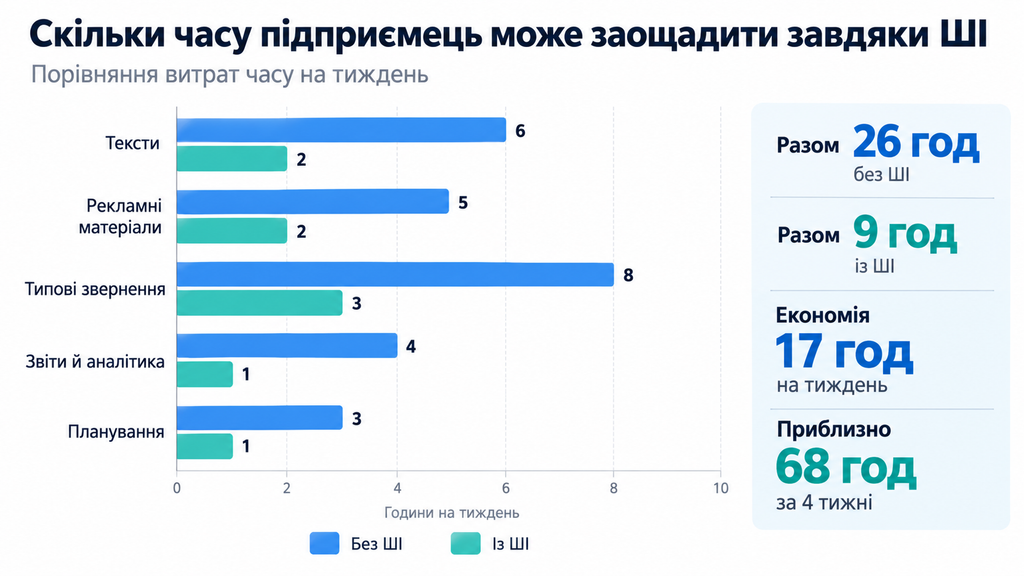
Savings depend on scale, process complexity and how much checking is required. Consider a hypothetical calculation for a shop where the owner handles marketing, documents and customers personally.
| Task | Without AI | With AI |
|---|---|---|
| Texts | 6 hours | 2 hours |
| Advertising materials | 5 hours | 2 hours |
| Typical enquiries | 8 hours | 3 hours |
| Reports and analytics | 4 hours | 1 hour |
| Planning | 3 hours | 1 hour |
| Total | 26 hours | 9 hours |
That is 17 hours a week, or roughly 68 hours over four weeks. This is a calculated example, not a promise.
What freed-up time is worth
If you value an owner’s hour at 300 UAH, the freed-up time is worth 20 400 UAH over four weeks. This is not profit or cash in the bank. But those hours can be invested in finding new clients, negotiations or product development.
Don’t forget subscription costs, integration setup and maintenance. Without them the comparison is incomplete.
Can AI act as a sales manager?
What it can do
Partly, yes. For example, a buyer on an electronics shop website asks which power bank will suit their laptop. If the digital advisor has access to the current catalogue with specifications, it will clarify the model and suggest compatible options, then help place the order and send status updates.
But a standard neural-chatbot does not know what is in stock. For that you need a connection to the shop’s database or CRM.
Load distribution
Imagine 40 messages a day, 25 of which are about delivery, payment, sizes or availability. If the bot successfully handles those 25 enquiries, the owner is left with 15 complex conversations. This is a hypothetical example, not a statistic.
It’s important that a customer can quickly reach a real person, especially regarding refunds, complaints or order errors.
Finance without dozens of spreadsheets
What AI sees in the numbers
Finances often drain entrepreneurs the most. Income, expenses, purchases, taxes and supplier payments require constant attention. AI helps process data faster and notice things that are easy to miss manually.
For example, a shop’s revenue rose from UAH 180 thousand to UAH 210 thousand, but advertising costs increased from UAH 15 thousand to UAH 35 thousand. AI would calculate that revenue rose by approximately 16.7%, while advertising expenses rose by 133.3%.
So increased sales alone do not necessarily mean the business became more profitable. For an accurate conclusion you need cost of goods sold, commissions, logistics, returns and taxes.
Where analysis ends and accounting begins
AI can categorise transactions, draft a budget or find suspicious deviations. But it should not be the one to determine tax liabilities.
For Ukrainian individual entrepreneurs (FOP) this is especially important because of different single-tax groups, specific accounting rules and changing legislation. Preparatory work can be given to AI, while calculations, reporting and legal compliance should be checked against official data or with an accountant.
And never allow an agent to transfer money autonomously without limits and your confirmation.
An AI team in seven days
A week-long plan
Dozens of subscriptions are unnecessary. It’s better to gradually test tools on real tasks.
- Write down all repetitive actions and choose the three longest ones.
- Choose a general-purpose assistant and test it on emails, texts and plans.
- Create reply templates for the most frequent customer questions.
- Set up ad preparation and a content plan.
- Build a test flow between the application form, a spreadsheet and the CRM.
- Run everything on test data, including errors and repeated submissions.
- Calculate saved time and costs, and decide what to automate next.
Realistic expectations
Within a week you can assemble a first working system for simple processes. But if orders are numerous, full implementation will take much longer.
How to explain your business to AI
Why vague prompts don’t work
The most common mistake of beginners is giving too general commands. The prompt “Write an ad for the shop” tells the model almost nothing.
It’s better to describe the assortment, average price, who your customers are, seasonality and the desired tone. Ask for three different options with concrete constraints.
A brand rules document
It’s useful to have a separate document describing tone of voice, list of services, delivery terms and answers to common questions.
Results will be more consistent, although you’ll still need to check them.
How much a digital team costs
Free and paid tiers
Cost consists of more than a subscription. It includes integrations, possible API expenses, scenario support and your own time.
You can start with free tiers. They are enough for tests, texts and simple document work. But they have limits on requests, features and models.
Paid plans become necessary when you have many large documents, need advanced features or integration with your systems. Make and similar platforms also have their tariffs, and price depends on how intensively you use them.
When a subscription pays off
For a start you can budget roughly 1 500–3 000 UAH per month. This is not a market price but an example testing limit. Actual costs may be lower or significantly higher.
If services cost 2 000 UAH and free up 20 hours, one hour costs 100 UAH. But account for time spent fixing errors and assess results over several weeks, not a single good day.
What not to entrust to AI
Errors and personal data
AI in business needs clear rules, especially when it has access to customer data, internal documents or payments. Even good models can fabricate facts, misinterpret a document or make mistakes in numbers.
Special attention must be paid to personal data protection. Before uploading a customer database, check the service terms and whether you have grounds to process the data that way.
In business plans of some services, work data by default is not used to train models, but you still need to configure access and protection rules yourself.
What to leave to humans
Bank transfers, refunds and other financial operations should remain under human control. Don’t fully hand over legally significant decisions, contracts, taxes or official reporting to AI.
Be cautious when working with confidential information and personal data. Complex disputes with customers and partners are also better resolved personally.
Separately, check advertising claims, prices and product specifications. An error in a description can lead to complaints and returns.
And watch out for subtle glitches. Due to an integration error a customer might receive the same message twice or an order could get the wrong status. Keep an action log, set up error alerts and regularly review how automations are working.
Small business with big opportunities
When everything works as one system
Generative AI, CRM, e-commerce and automation together make running a business without a large team increasingly accessible. The entrepreneur launches ads, prepares offers, analyses demand and works with customers.
The biggest effect comes not from another trendy service, but when daily processes connect into a single system. An order enters the CRM, data is passed to the necessary services, the customer receives a notification and the owner sees the result.
Responsibility remains with the human
In such a model the owner no longer spends all day transferring data between spreadsheets and endless correspondence.
But the owner remains responsible for product quality, financial decisions and customer relationships. How useful digital assistants turn out to be depends on that responsibility.
