




You can submit a declaration of property and income through the Electronic Cabinet of the taxpayer in 15–30 minutes if you prepare an electronic signature and your income data in advance. You can log in with a qualified electronic signature (QES), Diia.Signature or via ID.GOV.UA; then open the declaration in the “EC for citizens” mode, check the prefilled data, sign the document and wait for receipt No. 2 confirming acceptance. This instruction describes the procedure used in the 2026 campaign, and it is the procedure by which declarations for 2026 will be submitted from 1 January 2027, so before you start check the menu item names against the Cabinet’s current interface.
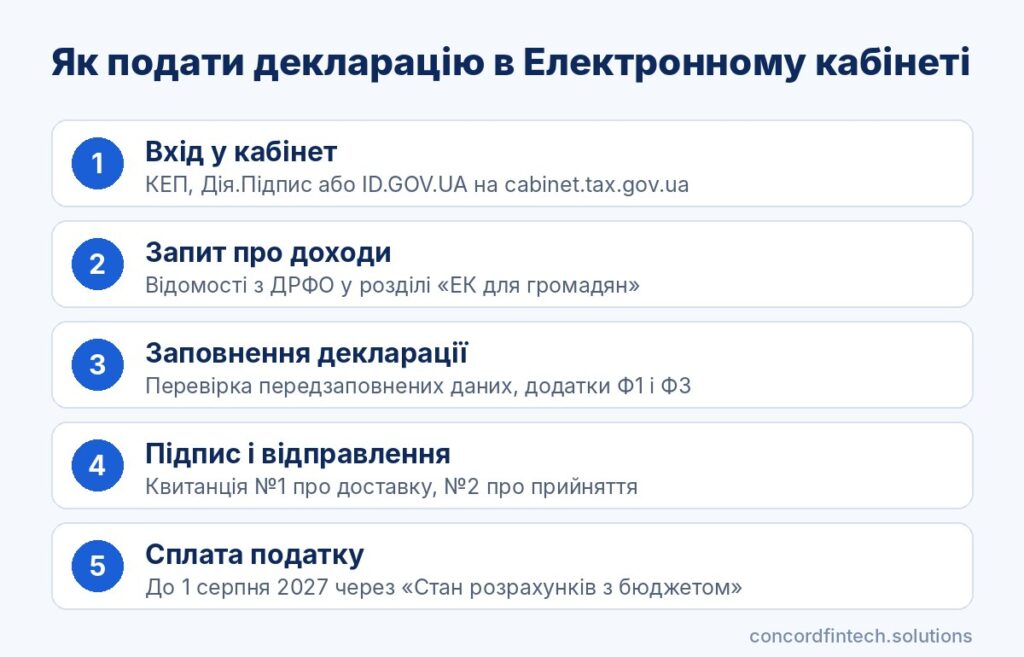
The whole process from login to confirmation fits into eight steps. A short algorithm is shown below, followed by a detailed breakdown of each stage.
- Check that you have a valid qualified electronic signature (QES) or an activated Diia.Signature.
- Log in to the private area of the Cabinet at cabinet.tax.gov.ua.
- Order income information from the State Register of Individuals — Taxpayers (DRFO) for the reporting year.
- Open “EC for citizens” and create the tax declaration for 2026.
- Check the prefilled incomes reported by tax agents and add your own incomes.
- Complete the necessary annexes and check the calculation of personal income tax (PIT) and the military levy.
- Sign and send the declaration, then wait for receipts No. 1 and No. 2.
- Pay the tax by 1 August 2027 via “Status of settlements with the budget” or through your bank.
Preparation for submitting the declaration online
What you need: QES, Diia.Signature or BankID
For logging into the Cabinet you can use a file-based or hardware qualified electronic signature (QES) from any qualified provider, a cloud QES, Diia.Signature, or login via ID.GOV.UA using BankID or MobileID. However, the declaration itself must be signed with a qualified signature, so BankID is convenient only for authorization.
Check your browser and signature settings
The Cabinet opens reliably in current versions of common browsers; outdated versions often block the signing module. For a file key you will need the key file, its password and, if required, certificates, so check their validity period in advance.
Data to have at hand
You will need your taxpayer identification number (RNOCPP), registration address, contracts and statements for any income received without a tax agent. It is useful to order a “Request for amounts of paid incomes” in the “EC for citizens” section of the Cabinet in advance, since the response usually arrives within an hour. For a tax deduction prepare scanned copies of expense documents, and for a refund of overpayment have your IBAN account details ready.
Logging in to the Electronic Cabinet
Authorisation via Diia.Signature
On the login page choose cloud signature or Diia.Signature, click “Get link” and scan the QR code with your smartphone camera. In the Diia app confirm your identity and the signing request, after which the Cabinet will open automatically. The same method is later used to sign the declaration.
Login with a file-based QES
Select the “File media” tab, upload the key file, enter the password and read the key. After successful verification the private area of the Cabinet will open with your registration data.
What to do if the Cabinet does not open
The most common reason is an expired key certificate or an incorrectly chosen provider. If the error persists, contact the information and reference department of the State Tax Service (DPS) at 0 800 501 007.
Filling in the declaration of property and income
Choosing form F0100215 and the reporting period
The most convenient route is via the “EC for citizens” mode, where the tax declaration section offers simplified completion with a questionnaire. Alternatively, you can create the form in the “Reporting entry” menu using the “Create” button, selecting the identifier for the declaration of property and income. The identifier used in the 2026 campaign was F0100215, but by Order of the Ministry of Finance No. 2 of 05.01.2026 the form was updated, so for reporting on 2026 choose the version the Cabinet offers as current.
In line 1 mark the document type as “reporting”, and in line 2 indicate the reporting year 2026. The Cabinet pulls payer data, tax address and the controlling authority from registers, so you only need to verify them.
Income section: lines 10.1–10.13
The system automatically pre-fills the declaration with incomes reported by tax agents and with data on taxable objects from other state bodies. Reconcile these amounts with the response to your income request, because an agent’s error will carry over into your declaration. Incomes without an agent, for example rent from an individual, inheritance from a non-relative or foreign income, should be added manually in the appropriate lines of Section II.
Annex F1 for investment income
Annex F1 is completed if you sold shares, bonds, stakes or other investment assets, including through a foreign broker. It lists income and expenses for each operation, and the resulting profit is transferred to the income section of the declaration.
Annex F3 for a tax deduction
A tax deduction is claimed in Annex F3, where you specify expenses for education, medical treatment, mortgage interest, rental of housing for internally displaced persons (IDPs) and other allowed categories. From 2026, following changes to the form, the right to a deduction for housing rental was also extended to combatants and to persons disabled as a result of the war.
Calculation of tax and the military levy in the declaration
Automatic calculation of PIT
After entering incomes the Cabinet automatically calculates the amount of personal income tax (PIT) at a rate of 18% for most incomes and 5% for certain types, such as inheritance or a gift from a non-relative. Check that amounts of tax you have already paid during the year are included in the calculation, in particular quarterly rental payments.
Military levy on declared incomes
The military levy is charged separately at a rate of 5% and is shown in its own line of the declaration. Different rules apply for individual entrepreneurs (FOP) on the general taxation system, but for ordinary individuals the rate is the same for rental, foreign and other incomes.
Credit for foreign tax
Tax paid abroad reduces the amount of PIT only if there is an international double taxation avoidance agreement. A mandatory condition is a certificate from the foreign tax authority, legalised or with an apostille if the agreement does not exempt from this.
Signing, sending and receipts
Check the document before signing
Before signing click “Check” or open the form preview. The Cabinet will highlight mandatory unfilled fields and logical errors that must be corrected. After saving, sign the document; in the signing window for Diia.Signature choose the “Cloud storage” tab and the Diia.Signature provider.
Receipt No. 1 and No. 2: what they mean
After sending you receive the first receipt confirming delivery of the document to the tax authority. It does not yet mean the declaration has been accepted, because the final decision is recorded in receipt No. 2. A comparison of receipts and declaration types is shown in the table.
| Document | What it means | What to do |
|---|---|---|
| Receipt No. 1 | The document has been delivered and passed initial checks | Wait for the second receipt |
| Receipt No. 2 “accepted” | The declaration has been registered; the filing date is the date shown in receipt No. 1 | Save the receipt, pay the tax |
| Receipt with refusal | The declaration was not accepted; the reason is given in the text | Correct the error and send the document again |
| Reporting new | Replaces the previous declaration until 1 May | Submit a full document with corrections |
| Amendment | Corrects an error after the deadline | Submit within 1,095 days |
Document status and replacing an incorrect declaration
The status of sent documents and all receipts are visible in the “Incoming/Outgoing documents” section and in the declaration tab itself. You cannot withdraw a declaration that has already been accepted, but until 1 May you can submit a “reporting new” declaration that will fully replace the previous one. After the deadline, an error is corrected only by an amendment declaration.
Common mistakes when submitting and how to fix them
Incorrect income or country code
The most common mistake concerns foreign incomes, when the taxpayer selects the wrong country or enters an amount in foreign currency without converting it. Foreign income should be converted into hryvnia at the National Bank of Ukraine (NBU) exchange rate on the date it was received.
Before sending, check the document using the short checklist below. These mistakes are the most frequent reasons for a declaration to be rejected or later amended.
- Unchecked DRFO data: an agent’s reported incomes may be incomplete, so verify the response to your request.
- Wrong document type: a “reporting new” after 1 May is not appropriate; an amendment is required.
- Missing annex: investment profit without F1 or a deduction without F3 produces an incorrect calculation.
- Paid tax not accounted for: quarterly rental payments must be shown, otherwise the amount is overstated.
- Incomplete IBAN: without a correct account the overpayment will not be refunded.
Missing annexes
If there is an amount in the income section that requires calculation in an annex but the annex is not completed, the Cabinet may refuse the document. Add the necessary annex in the form window, complete it and recheck the calculation before signing.
Incorrect tax due amount
If it becomes clear after submission that the tax was understated, submit an amendment declaration and pay the underpayment. Under clause 50.1 of the Tax Code, when correcting voluntarily before submitting an amendment a penalty of 3% of the underpayment is payable. You can pay the tax in the Cabinet via “Status of settlements with the budget” by card or QR code, or at a bank using the details for your tax address.
Frequently asked questions
Can I submit the declaration via Diia?
The Diia app itself does not offer this service, but Diia.Signature can be used to log in to the Electronic Cabinet and sign the declaration. For a declaration with a tax deduction the State Tax Service (DPS) also offers the mobile app “My Tax”.
How long does processing the declaration take?
Receipt No. 1 usually arrives within minutes or hours after sending. Receipt No. 2 generally arrives the same day or at the latest by the next working day, and the filing date is considered the date shown in the first receipt.
What to do if you receive a receipt with a refusal?
Read the reason for refusal in the receipt text, correct the error and resend the declaration. A rejected document is considered not filed, so a resubmission must be made before the deadline of 30 April 2027.
Can I submit a declaration on behalf of someone else?
Online declarations must be signed by the taxpayer’s own QES or Diia.Signature, so you cannot use someone else’s key. A representative with a notarised power of attorney can submit a paper declaration at a Taxpayer Service Centre (TSC) for the taxpayer’s tax address.
